Warm up a new mailbox before it sends cold.
A brand-new inbox that suddenly sends a hundred cold emails looks like spam. Swokei ramps it up slowly so it builds a real sending reputation first.
- Automatic ramp over 30 days
- Health score and bounce-risk on every mailbox
- Pause, resume, or set your own cap
- Runs per mailbox, in the background
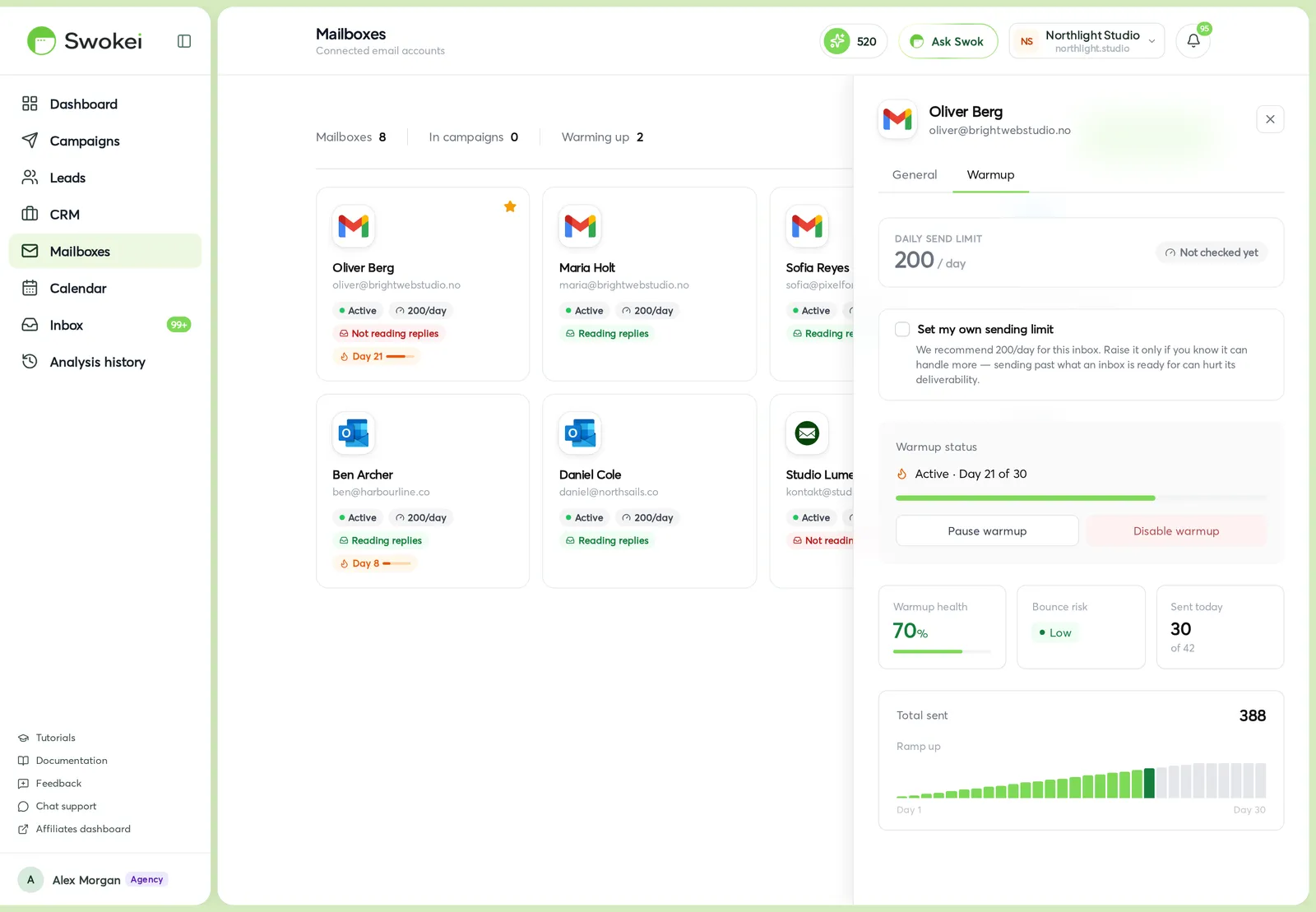
New domains and inboxes have no sending history. Warmup grows the daily volume gradually, day by day, so mailboxes reach full speed without tripping spam filters and burning the domain on the first campaign.
The daily send limit climbs from a handful on day one to full volume by day 30. Swokei paces every mailbox on its own schedule.
Each mailbox shows a warmup health score, a bounce-risk level, and how much of today's capacity it has used — so you know which inboxes are ready.
Turn warmup on when you connect a mailbox, pause or resume it any time, or set your own daily cap if you know the inbox can take more.
What warmup does behind the scenes.
A per-mailbox schedule that protects your deliverability before the first cold email ever goes out.
The daily limit rises across 30 days. You see exactly which day each mailbox is on and where it lands next.
A single number that climbs as the mailbox warms, so an at-a-glance read tells you whether it's ready to send.
Low, medium or high — a plain flag on each mailbox so you never launch a campaign from an inbox that isn't ready.
Sent-today against the day's cap, so you can see how much room a mailbox still has before it hits its limit.
Warmup pauses and picks back up without losing its place. Disable it entirely on inboxes that are already established.
Trust an inbox to handle more? Override the recommended cap — with a warning if you push past what it's ready for.
How it works
Connecting a mailbox has a warmup step. Switch it on and Swokei starts the ramp from day one.
Each day the mailbox is allowed a little more volume, following its 30-day schedule automatically.
The Warmup tab shows the day, the health score, the bounce risk, and today's usage as the inbox builds reputation.
By the time the ramp finishes, the mailbox sends at full volume with a real history behind it — no spam flag from a cold start.
On the Mailboxes page — open any mailbox and switch to the Warmup tab, or turn it on in the connect flow when you add a new inbox.
Included free on every plan. Warmup runs on your own connected mailboxes and costs no credits.
Agencies that let Swokei do the outreach
The main thing I like is that the emails actually have something relevant to say. Instead of sending the same pitch to everyone, I can mention their design, SEO or mobile experience without doing the research manually.
Great tool. I'd recommend Swokei to any web designer looking to get more web design clients.
We were already doing outreach for our web design company, but most of the time we were guessing what to say. Now we let Swokei analyze business websites, find real issues, and turn them into personalized emails we can still send at scale.
We run a small web design agency and outreach has always been one of those things we know we need to do but never had enough time for. Swokei made it much easier to keep it consistent.
We send far more outreach than before and it's more personal, not less. That combination just didn't exist for us until this.
One of my employees kept telling me to give Swokei a try. I was pretty skeptical at first, but after using it for a while, it quickly became part of our daily outreach.
Ready to take control of your outreach?

Reads every prospect's site and writes the outreach that lands you the work.